The Hydrogen Spectrum
Your Task Today
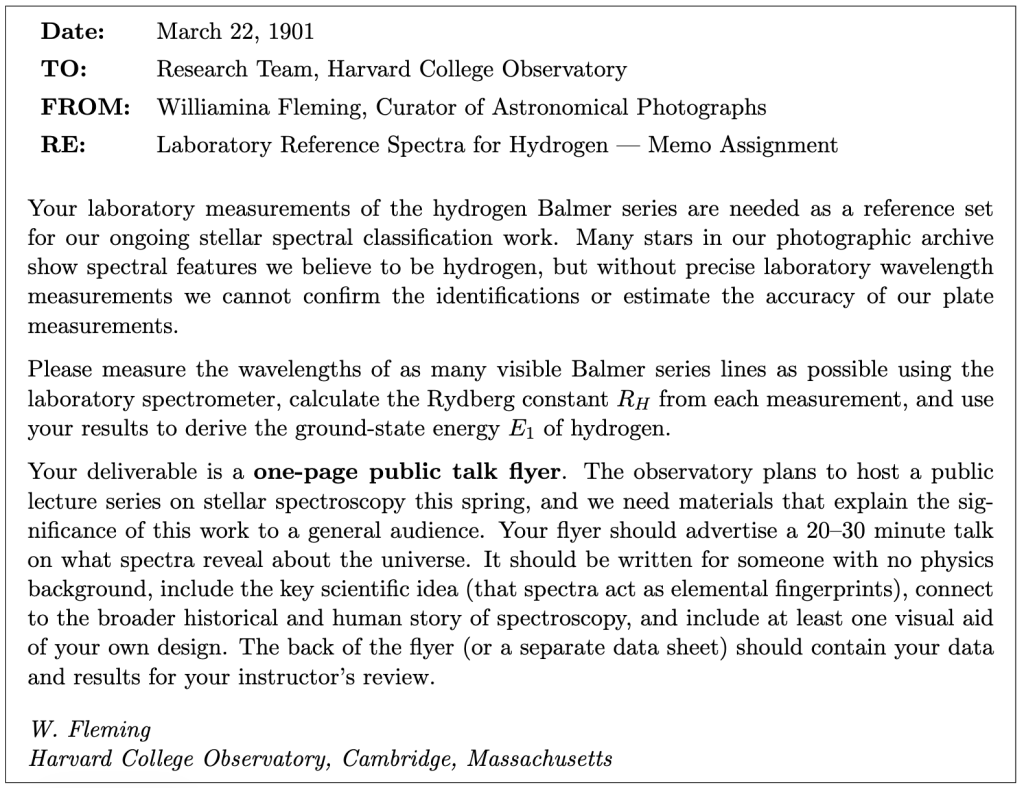
Section 1: Getting to Know the Apparatus
Equipment
- Vernier Red Tide spectrometer (USB, powered by computer)
- Fiber-optic cable (attached to spectrometer input)
- Vernier LoggerPro software
- Hydrogen discharge tube with power supply
The Red Tide spectrometer contains a diffraction grating and a linear CCD-array detector. The fiber-optic cable collects light from the source and carries it to the grating, which disperses the light by wavelength. The CCD measures the intensity at each wavelength, and LoggerPro displays the result as intensity versus wavelength. You will use the cursor tool in LoggerPro to read peak wavelengths and FWHM values directly from the spectrum plot.
Section 2: Setting Up the Spectrometer
- Connect the Red Tide spectrometer to the USB port if not already connected.
- Open Vernier LoggerPro. From the Experiment menu, choose Change Units → Spectrometer → Intensity.
- To access spectrometer settings, choose Set Up Sensors → Spectrometer: 1 from the Experiment menu. The key parameter you may need to adjust is the Integration Time. Leave the other settings at their defaults.
- Turn on the hydrogen discharge tube and allow it to warm up for 2–3 minutes. Point the tip of the fiber-optic cable at the center of the discharge tube, several centimeters away.
- Dim the room lights while taking data.
- Click Collect in LoggerPro. You should see a spectrum appear.
Integration time. At the default integration time (32 ms), the most intense hydrogen line (near 656 nm) may saturate the detector — the peak will appear flat-topped and the wavelength cannot be measured reliably. Reduce the integration time until the peak is on scale. The shorter-wavelength lines (below 450 nm) are much less intense; you may need to increase the integration time to see them clearly. Collecting spectra at two or three different integration times and combining the results is a good strategy.
Section 3: Measuring the Hydrogen Spectrum
Part A: Initial observation
Collect a spectrum at the default integration time. You should see at least one or two hydrogen lines.
- Describe what you observe. How many lines are visible? Where are they located (color, approximate wavelength)? How do your observations compare to your pre-lab sketch?
Part B: Collecting all visible lines
Adjust the integration time as needed to observe as many hydrogen lines as possible. You should be able to see at least 4 lines; with care, 5 or more may be visible. At high integration times, you may see a broad irregular cluster of small peaks near 600 nm — this is contamination from other gases in the discharge tube; ignore it and focus on the sharp, bright Balmer lines.
For each line you observe, use the cursor tool in LoggerPro to measure the peak wavelength λ (nm) and the FWHM of the peak (nm) — this is your wavelength uncertainty δλ. Use the regular pattern of the Balmer series (compare to your pre-lab energy level diagram) to identify which quantum number ni corresponds to each line.
Section 4: Calculating the Rydberg Constant
Part A: Individual measurements
For each spectral line, rearrange the Balmer formula to solve for the Rydberg constant:

Propagate your wavelength uncertainty δλ to find the uncertainty δRH using the power rule. Since RH ∝ λ−1:

- Calculate RH and δRH for each spectral line you measured. Show one complete calculation, including unit conversions and uncertainty propagation.
- Calculate the mean value of RH from your individual measurements. For the uncertainty of the mean, use the standard deviation of your values divided by N1/2 (the standard error of the mean), where N is the number of lines you measured. Report your result as RH ± δRH
Section 5: Graphical Analysis
The Balmer formula can be written as a linear equation. Define
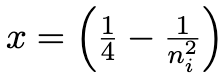
Then:

This is a straight line through the origin with slope RH.
- For each spectral line, calculate x and 1/λ. Plot 1/λ (y-axis) versus x (x-axis) in Excel. Use LINEST with a forced zero intercept to find the slope (your graphical RH) and its uncertainty.
LINEST reminder: Select a 2 × 1 block of cells and enter =LINEST(y-values, x-values,
FALSE, TRUE) as an array formula (Ctrl+Shift+Enter on Windows; Command+Return on Mac). The result is [slope, σslope]. With FALSE, the intercept is forced to zero.
Report your graphical result for RH.
Section 6: Deriving the Ground-State Energy
From the Rydberg constant you can derive the ground-state energy E1 of hydrogen. From your pre-lab, the relationship is:

Use hc = 1240 eV · nm = 1240 × 10−9 eV · m.
- Using your mean RH (Section 4), calculate E1 with its propagated uncertainty. Then using your graphical RH (Section 5), calculate a second value of E1. Compare both values to the accepted value E1 = −13.606 eV. Is the accepted value within two standard deviations of each of your measured values?
- Which method gives a smaller uncertainty in RH? Why do you think that is? Which result do you trust more, and why?
Section 7: Reflection
- The hydrogen spectrum has a very regular pattern — the lines get closer together and decrease in intensity as the wavelength gets shorter. Explain this pattern in terms of the hydrogen energy level diagram. Why do the lines converge as ni increases?
- You may have observed spectral features that do not correspond to any Balmer series line. What is a likely source of these extra lines? How did you decide which lines to include in your analysis and which to exclude?
- If you were analyzing a stellar spectrum and trying to identify hydrogen, what specific features of the Balmer series pattern would help you distinguish hydrogen from other elements?
Section 8: Public Talk Flyer
Working as a group, create a one-page public talk flyer advertising a 20–30 minute talk on atomic spectra and what they reveal about the universe. Your flyer should be designed for a general audience with no physics background.
What to include:
- A title for the talk
- A hook — one or two sentences that make a non-scientist want to attend
- The central scientific idea, explained without jargon: that spectra act as elemental fingerprints
- A connection to the Harvard computers (Fleming, Cannon, Payne) and the human story of spectroscopy
- At least one visual aid of your own design
- Fake event details (date, time, location) that make the flyer look realistic
What to avoid: technical equations; jargon without plain-language explanation; a bulleted list of facts instead of a narrative. The flyer should tell a story.
Learning Objective Alignment
Use this table when building your grade proposal to identify which parts of this assignment provide evidence for each learning objective.
| Section / Question | Learning Objectives |
|---|---|
| Section 1–2 (Apparatus, Setup) | 3, 6 |
| Section 3, Question 1 | 1, 3 |
| Section 3b (Data table) | 3, 5 |
| Section 4, Question 2 | 1, 5, 6 |
| Section 4, Question 3 | 5, 6 |
| Section 5, Question 4 | 5, 6 |
| Section 6, Question 5 | 1, 5 |
| Section 7, Questions 6–7 | 5, 6 |
| Section 8, Questions 8–10 | 1, 2 |
| Section 9 (Flyer) | 7, 8 |

